
cPanel Management Account RE-VALIDATE PASSWORD scam.
Password expiration phishing scam
 cPanel Management Account RE-VALIDATE PASSWORD scam.
Password expiration phishing scam.
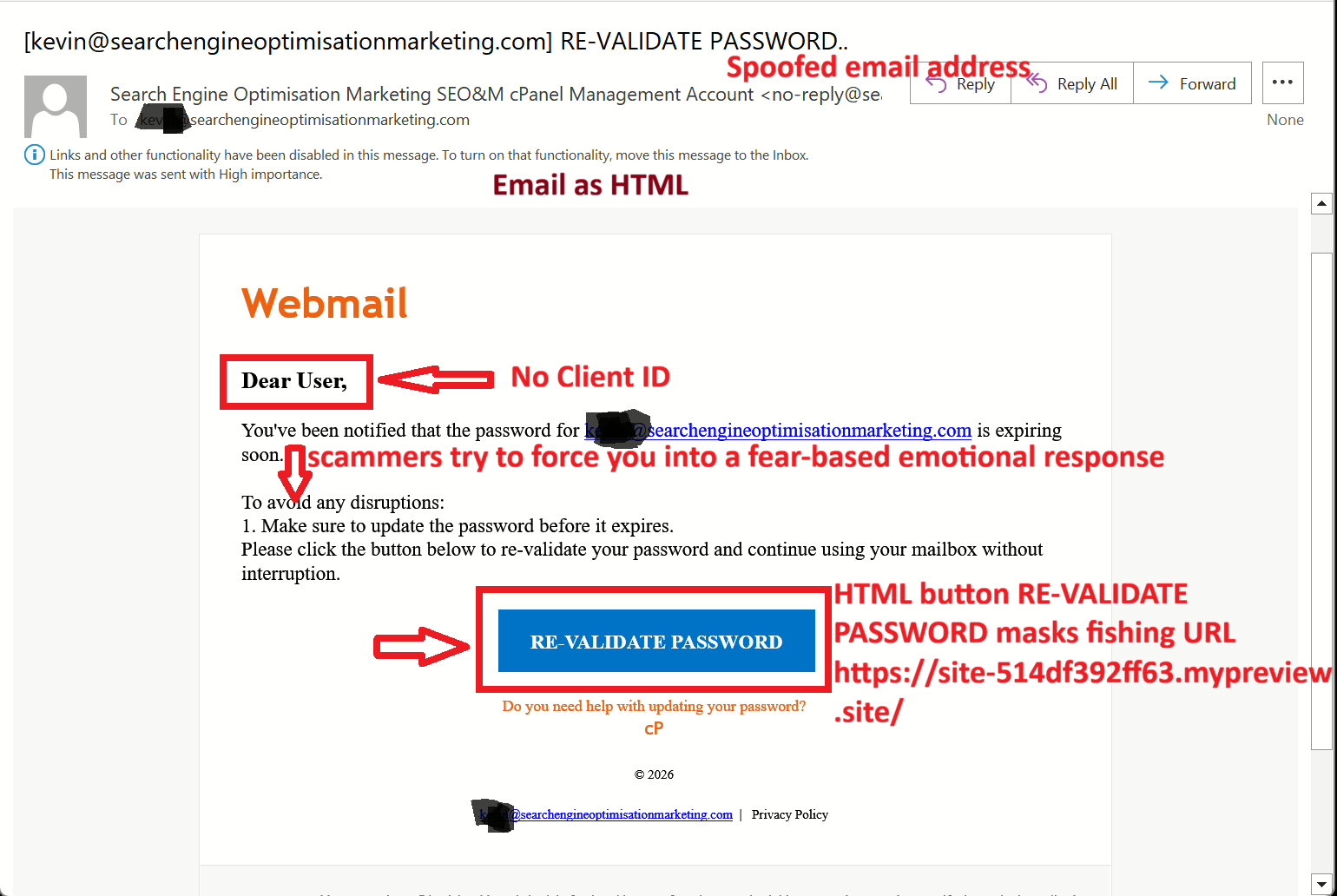
cPanel Management Account RE-VALIDATE PASSWORD scam is a an easy to spot scam that attempts to force you into an emotional fear-based response by clicking on the RE-VALIDATE PASSWORD button which directs you to a cloned cPanel login page.
I was nearly fooled by this scam, however the first red flags is the email is not from cpanel@yourserver.com, moreover the Client ID is Dear User and not my username. Dear User indicates the scammers don’t have your Client ID and the email is not from cPanel. Note the scammers try to force you into a fear-based emotional response by clicking on the RE-VALIDATE PASSWORD HTML button by using phrases: To avoid any disruptions, update the password before it expires, Please click the button below to re-validate your password and continue using your mailbox without interruption.
Stop, pause evaluate.
Email as HTML and note one of the red flags is the email is not from cpanel@yourserver.com.
The same email was converted to plain text with the HTML stripped out.
Note no Client ID.

Zero Trust Policy.
My email client is set to view all emails as plain text and I view all emails with the Zero Trust policy. While these tasks might come across as tedious and paranoid, Zero Trust Policy is recommended by all top Cyber Security Professionals as not only are the spammers getting the spoofed mail to look more like the real deal, they are correlating user’s online details as well as their offline details.
Stop, pause evaluate.

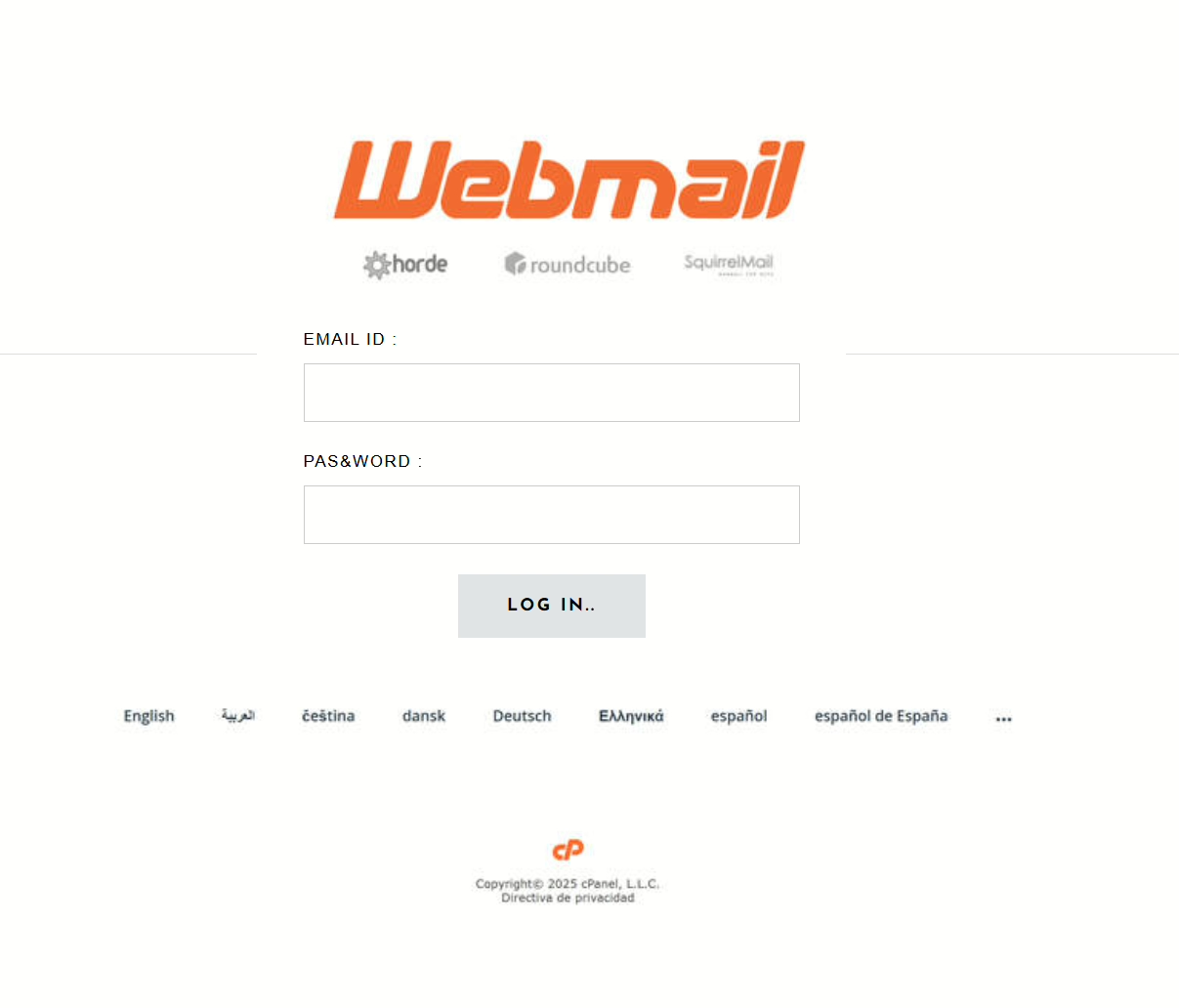
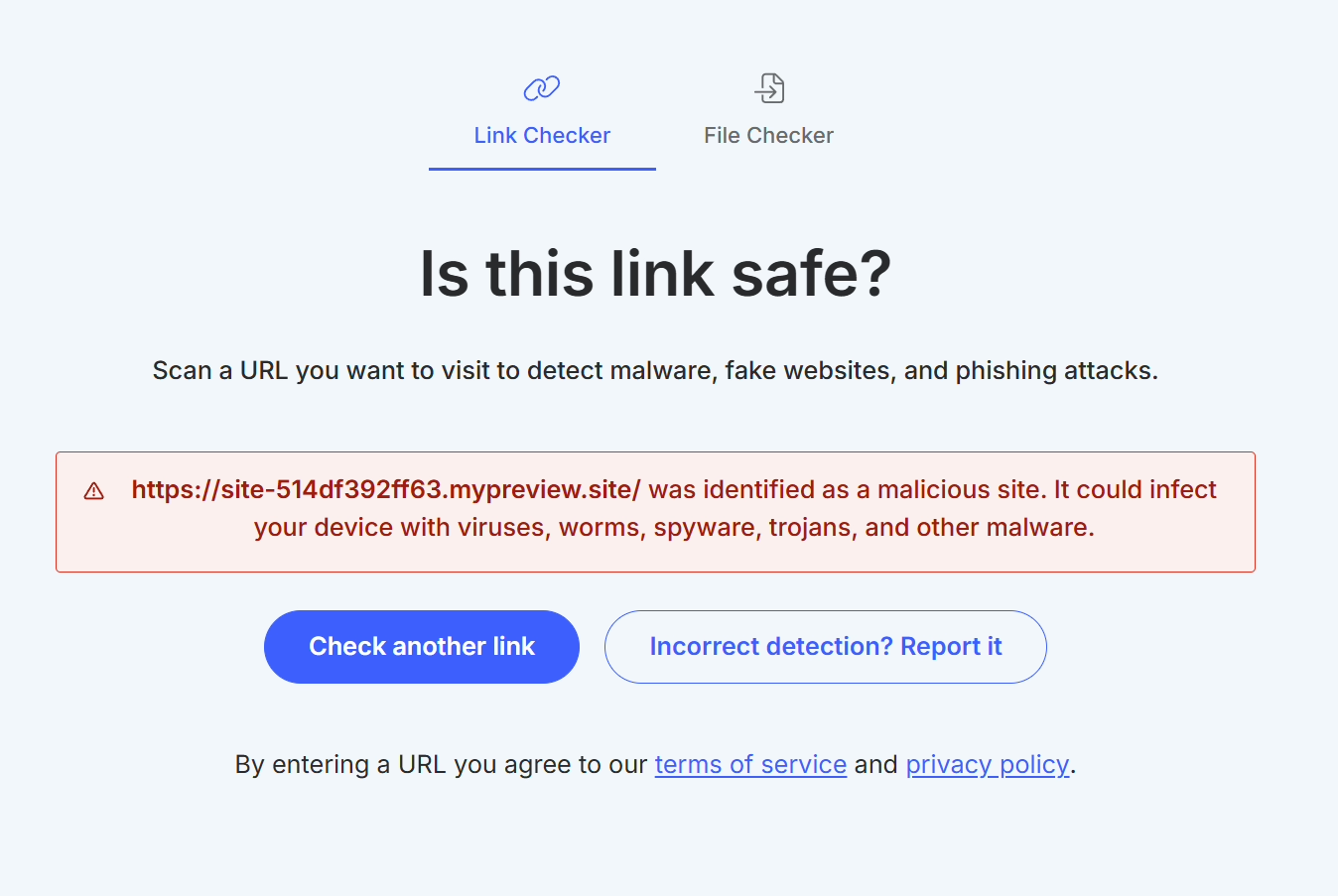


Red Flags That Expose the Scam.
- Suspicious “From” Address
- The email came from #######@searchengineoptimisationmarketing.com, not from your actual web hosting provider.
- Legitimate cPanel or hosting password alerts always come from addresses like cpanel@yourserver.com or support@yourdomain.com.
- This mismatch is your first major clue.
- Generic Greeting (“Dear User”)
- Real system messages use your registered name or account username.
- “Dear User” is a telltale sign of a mass phishing blast, not a personalised notice.
- Fake Sense of Urgency.
- “Your password is expiring soon” pressures you into quick action.
- Attackers use urgency to override critical thinking and prompt immediate clicks.
- Suspicious Link Domain.
- The button links to a temporary site: site-514df392ff63.mypreview.site.
- Real services never use builder-preview or temporary URLs for password resets.
- Stylistic Errors.
- Inconsistent capitalization (“RE-VALIDATE PASSWORD..Webmail”), awkward formatting, and an incomplete footer (“cP © 2026”) all suggest a fake email template.
- No Secure HTTPS Branding or Verified Domain.
- Hovering over the link reveals a domain that has nothing to do with your hosting provider.
- Always verify that any password reset page is served from your official domain.
- Fake Privacy Policy & Branding.
- The “Privacy Policy” link doesn’t lead anywhere meaningful, another red flag that this is a phishing operation, not a legitimate company.
What You Should Do Instead?
- Never click links in unsolicited password alerts.
Instead, manually log in to your hosting control panel or email account. - Check the sender’s email domain carefully.
Is it exactly your provider’s address? - Enable Two-Factor Authentication (2FA) for your accounts to add an extra layer of protection.
- Report the email as phishing to your provider and delete it.
Other tools Hosting companies can provide to reduce spoofing:
Sender Policy Framework (SPF) is an email authentication method to detect spoofed email headers by whitelisting IP addresses that can send emails for the domain. Email servers perform an SPF lookup and then reject the mismatched email as spam. Email servers execute an SPF lookup preventing spammers from using spoofed domains in the email envelope.
DKIM (DomainKeys Identified Mail), is an email authentication method to detect spoofed sender addresses by cryptographically signing sent emails with a signature for the organisational level corresponding to a public key is published to the DNS records. The email is sent and DKIM (DomainKeys Identified Mail) makes sure the email is not altered on the pathway between sending and receiving.
Domain-based Message Authentication Reporting & Conformance (DMARC) is an email security protocol. DMARC verifies email senders by combining Domain Name System (DNS), DomainKeys Identified Mail (DKIM), and Sender Policy Framework (SPF) protocols. DMARC requires DKIM or SPF to be in place on an email domain and a DMARC record to be published in the DNS. DMARC enforces an alignment MAIL FROM and the sender and enables the email domain’s policy to be shared and authenticated after the DKIM and SPF status has been checked.
Spoofing is a method of delivery; Phishing is a method of retrieval.
A cPanel email notice typically looks like a system alert from your host (e.g., "cPanel on yourserver.com"), often with a clear subject line indicating an event like "Disk Usage Warning," "Service Failure," or "Account Notification," containing details about server status or account changes, and includes links to review settings or log in, though beware of fake cPanel emails with suspicious links trying to trick you into clicking them for phishing.
cPanel Management Account RE-VALIDATE PASSWORD scam.
Password expiration phishing scam.
A cPanel email notice typically looks like a system alert from your host (e.g., "cPanel on yourserver.com"), often with a clear subject line indicating an event like "Disk Usage Warning," "Service Failure," or "Account Notification," containing details about server status or account changes, and includes links to review settings or log in, though beware of fake cPanel emails with suspicious links trying to trick you into clicking them for phishing.
Zero Trust Policy
My email client is set to view all emails as plain text and I view all emails with the Zero Trust policy. While these tasks might come across as tedious and paranoid, Zero Trust Policy is recommended by all top Cyber Security Professionals as not only are the spammers getting the spoofed mail to look more like the real deal, they are correlating user’s online details as well as their offline details.
Stop, pause evaluate.
What I Do.
I specialise in Digital Footprints for new Startups and Identities struggling to be found in Search.

Google Maps Marketing Local SEO
Google Maps Marketing Local SEO is the art of optimising your online presence and increasing foot traffic to your local based business.

SEO Content Copywriting
SEO Digital Content Copywriting is the art of copywriting keyword/phrase content that is found in search results that converts.

Search Engine Marketing SEM
Search Engine Marketing SEM is a paid advertising strategy, like pay-per-click (PPC) increasing website visibility to appear as search results in Search Engine Results Pages SERPs.

WordPress Websites
WordPress is an open-source versatile content management system CMS for users to create easy functional beautiful looking websites that is found in search

WordPress SEO
WordPress SEO is the art of of getting your WordPress Website Pages on #Page1 of Organic Search Results for your Keywords/Phrases/Products/Services to your (best converting) target audience.

WordPress Website Maintenance
WordPress Website Maintenance is the process of keeping your website functioning properly, fast, secure, backed-up, up-to-date and in line with best practices that supports your SEO strategy.

Photography
Photography is the art of capturing an instant in time by recording the light you see and applying a filter of your innermost thoughts.

360° Virtual Reality Video
Let's Work Together!
Contact SEO Cape Town.
5 Clarendon Court, Melrose Road, Muizenberg, Western Cape 7945, South Africa VFR9+XP Lakeside, Cape Town
(+27) 060 904 5988
Email Me
Follow Us

First Peoples Land Statement
Search Engine Optimisation Marketing operates on the traditional, ancestral and unceded lands of the San and Khoe peoples. I wish to acknowledge the lands of the First Peoples we now occupy.