
How Fake DocuSign “Sign This Document” emails Trick Users in Africa?
Phishing emails impersonating trusted platforms like DocuSign are becoming increasingly common in South Africa and across Africa.
How Fake DocuSign “Sign This Document” emails Trick Users in Africa?
Phishing emails impersonating trusted platforms like DocuSign are becoming increasingly common in South Africa and across Africa. These scams rely on one simple psychological trigger; urgency combined with trust. Most people associate DocuSign with legitimate business workflows, contracts, HR documents, invoices or legal agreements, however that familiarity is exactly what scammers exploit.


What are the Red Flags for DocuSign Phishing Scam Emails?
First Red Flag: I don’t and have never used the service before, DocuSign. One important security rule is simple, if you were not expecting a document, you must assume it is suspicious until proven otherwise. In a legitimate DocuSign workflow, you know the sender or company moreover you are expecting a contract or form. The request includes context (project name, company name, reference ID). In phishing cases, attackers send mass emails hoping someone forgets, panics, or reacts quickly. No expectation = high risk spraymail.
Second Red Flag: Fake Sender Domain, where the senders email does not match DocuSign for example from domains like docusign.com and docusign.net. In this scam example, the sender is:(mailto:admin@experanza.pe) which is unrelated to DocuSign and often completely random string of letters and numbers. Scammers do this because they rotate domains constantly, use compromised or cheap hosting domains and bypass simple email filters. The mismatch between brand (DocuSign) and sender domain is one of the strongest phishing indicators.
Third Red Flag: the use of “FW:” to create Fake Email Chains.
The subject line uses: FW: Completed: Complete with DocuSign. This is a psychological trick, it creates the illusion that the email is part of an ongoing conversation and someone already interacted with it. It is a continuation of a legitimate process but in reality, there is no prior email chain.
A typical phishing message like DocuSign scam phishing email often includes:
A subject line such as: “FW: Completed: Complete with DocuSign: Contract 8809 192nd St SE -(mailto:*****@hotmail.com.pdf)”.
A sender that looks unrelated or suspicious: [admin@experanza.pe].
A greeting like: “Hello,” (with no name or client number)
A link that looks like a document review portal: “REVIEW DOCUMENT.”
At first glance, it mimics a real workflow email however the attacker intentionally structures it to look like: A forwarded conversation (“FW:”). A completed contract. A pending signature request. But several red flags appear immediately once you slow down and inspect it
Fourth Red Flag: Generic Greeting Dear, Hello, Customer, no name or client ID. A legitimate contract request usually includes: Your full name, company name, document ID or envelope reference with context like “employment contract,” “invoice approval,” or “service agreement”. The scam email says: “Hello,”. That alone is a major red flag. Phishing systems often do not know your identity, so they use: “Greeting Dear, Hello, Customer, Attention” this lack of personalisation is a strong indicator of automation.
Stop, pause evaluate.
HTML email:
Note the use of the use of “FW:” to create Fake Email Chains and the illusion that the email is part of an ongoing conversation.

Plain text email:
Email as plain text, HTML stripped out revealing phishing link
masked by the Review Document button.

How Fake DocuSign “Sign This Document” emails Trick Users in Africa?
Phishing emails impersonating trusted platforms like DocuSign are becoming increasingly common in South Africa and across Africa.

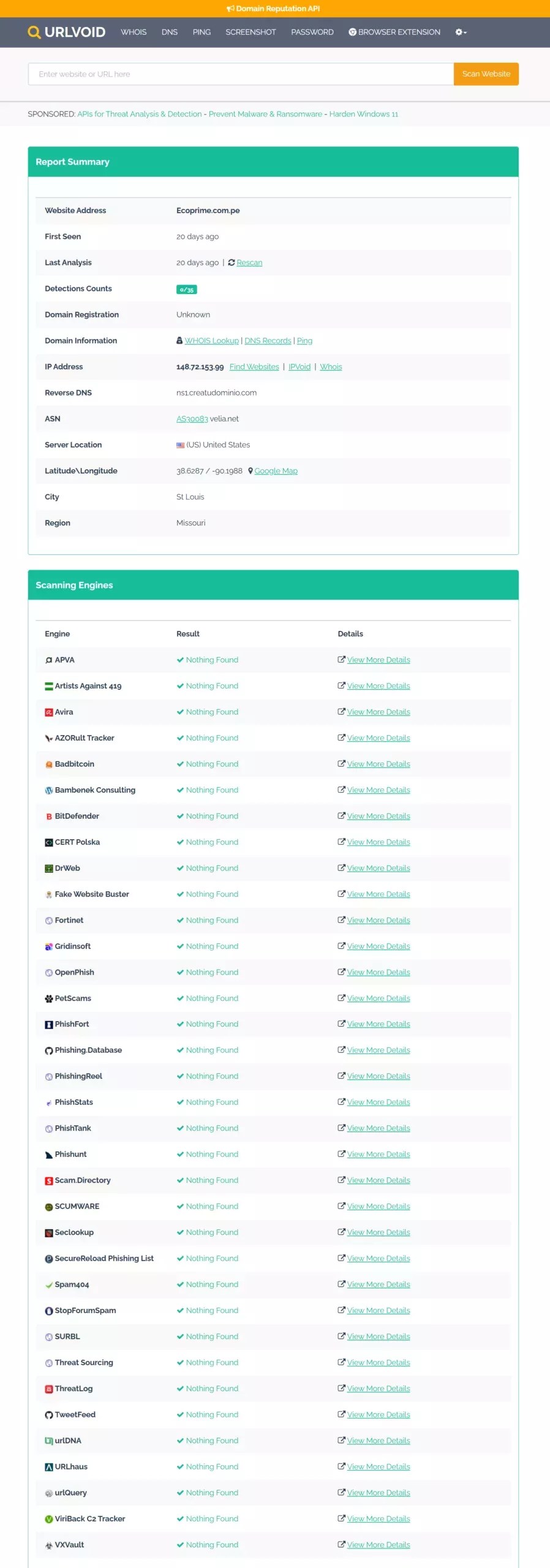
The Dangerous Link: The most critical part of the scam is the link: http://ecoprime.com.pe/assets/bi/# *****@hotmail.com. At first glance, someone might check it using a basic URL scanner and see “no obvious malware detected.” But here is the problem that URL scanners are not perfect, as many scanners only check reputation, they do not fully execute the page and they miss newly created phishing sites. So, a link can appear “clean” initially but still be dangerous.
Why Chrome Blocks the Phishing Page?
When Google Chrome shows a warning like: “Dangerous site: Attackers on the site might trick you…” It means that the page matches known phishing patterns, moreover it has been reported by users and it behaves like credential-harvesting pages. These warnings are based on real-time threat intelligence so in practical terms, so if Chrome blocks it, do not proceed under any circumstances. Even if the page looks simple or harmless, modern phishing pages are designed to capture passwords, steal email logins, harvest credit card or identity data and install malicious scripts or redirects.
Why Scammers Use DocuSign Branding?
Attackers choose DocuSign because people trust digital signatures, businesses use it frequently It creates urgency (“sign now”) Users are conditioned to click without overthinking The goal is not to hack systems directly—it is to trick humans into voluntarily handing over access.
Why URL “Link Checkers” Can Be Misleading?
A a URL checker that showed “no malicious activity” on the phishing link, however this is common and why you should also have browser protection like Avast Online Security & Privacy and Malwarebytes.
Why URL checkers says SAFE? The domain may be newly created (no history yet), the site may activate malicious behaviour only after interaction or certain IP ranges, the payload may be hidden behind scripts or redirects, moreover the URL scanner may not simulate real user login behaviour, therefore a clean scan result does NOT guarantee safety.
What the Attackers Actually Want?
This type of phishing is usually designed for one of four outcomes:
1. Credential theft. Stealing your email password, work login, banking credentials,
2. Identity harvesting. Collecting: Name, email, phone number, address data.
3. Financial fraud. Tricking users into: Signing fake invoices, authorising payments, entering card details.
4. System access. In business environments: Gaining access to corporate email, moving laterally into internal systems,
What You Should Do if you receive a phishing email?
Do not: Click the link, download attachments, enter credentials, do not reply to the sender.
Do: Delete the email and report it as phishing in your email client, block the sender domain and inform colleagues and IT department if it is a work account,
If you already clicked: Change passwords immediately and enable multi-factor authentication, moreover check for unauthorized logins and run a malware/virus scans.
How Fake DocuSign “Sign This Document” emails Trick Users in Africa?
Phishing emails impersonating trusted platforms like DocuSign are becoming increasingly common in South Africa and across Africa.
How to Spot email Scams Faster?
Ask yourself:
Was I expecting a document?
Do I recognize the sender domain?
Is the greeting personal or generic?
Does the link match the official DocuSign domain?
Am I being rushed or pressured?
If even one answer feels off, pause and verify independently.
Why These Scams Are Increasing in Africa?
Several factors make regions like South Africa more exposed: Rapid digital adoption in business communication. Heavy reliance on email for contracts. Growing remote work and freelance activity. Users trusting global SaaS platforms by default. Limited awareness of advanced phishing techniques. Attackers exploit this gap aggressively because it scales globally at very low cost.
Conclusion: Trust the Process, Not the Message
Phishing emails impersonating DocuSign are effective because they blend legitimacy with urgency. They mimic real business workflows, but break down under careful inspection, for example mismatched domains, generic greetings, suspicious links, and unexpected requests. The most important defence is not technical, it is behavioural. If you are not expecting a document, slow down. Verify outside the email. Never trust urgency alone. In modern phishing attacks, hesitation is not a weakness, it is protection.
Stop, pause evaluate.
Here are some popular tools that can help you ensure a website is safe before you visit it:
Google Safe Browsing: Integrated into browsers like Chrome, this tool checks websites against a list of unsafe sites and warns you about malware, phishing, or other potential threats.
VirusTotal: This tool allows you to submit URLs (or files) and checks them across multiple antivirus engines to identify threats. It’s widely used to analyze links for malicious content.
URLVoid: This tool scans websites for potential safety risks by using various reputation databases. It can help identify phishing, malware, or other harmful activities on a website.
Sucuri SiteCheck: A free website scanner that detects malware, blacklisting status, spam, and other security issues.
Stop, pause evaluate.
What I Do.
I specialise in Digital Footprints for new Startups and Identities struggling to be found in Search.

Google Maps Marketing Local SEO
Google Maps Marketing Local SEO is the art of optimising your online presence and increasing foot traffic to your local based business.

SEO Content Copywriting
SEO Digital Content Copywriting is the art of copywriting keyword/phrase content that is found in search results that converts.

Search Engine Marketing SEM
Search Engine Marketing SEM is a paid advertising strategy, like pay-per-click (PPC) increasing website visibility to appear as search results in Search Engine Results Pages SERPs.

WordPress Websites
WordPress is an open-source versatile content management system CMS for users to create easy functional beautiful looking websites that is found in search

WordPress SEO
WordPress SEO is the art of of getting your WordPress Website Pages on #Page1 of Organic Search Results for your Keywords/Phrases/Products/Services to your (best converting) target audience.

WordPress Website Maintenance
WordPress Website Maintenance is the process of keeping your website functioning properly, fast, secure, backed-up, up-to-date and in line with best practices that supports your SEO strategy.

Photography
Photography is the art of capturing an instant in time by recording the light you see and applying a filter of your innermost thoughts.

360° Virtual Reality Video
Let's Work Together!
Contact SEO Cape Town.
5 Clarendon Court, Melrose Road, Muizenberg, Western Cape 7945, South Africa VFR9+XP Lakeside, Cape Town
(+27) 060 904 5988
Email Me
Follow Us

First Peoples Land Statement
Search Engine Optimisation Marketing operates on the traditional, ancestral and unceded lands of the San and Khoe peoples. I wish to acknowledge the lands of the First Peoples we now occupy.